Did You Know? #8 Tracking Hurricane Bill

You can track Hurricane Bill and other hurricane activity in the Atlantic and Pacific Oceans at the National Weather ServicesNational Hurricane Center. You can also subscribe to a RSS feed that will automatically update you on changes in the storms status and provide you with GIS Shapefiles.

In 1938 A large hurricane made landfall in New England , visit the following resources for more information:

PBS
NOAA Coastal Services Interactive Map (GIS Data Download)
The University of Connecticut’s 1938 Hurricane Story
The Connecticut State Library 1938 Aerial Photos

Map of the Week! #3 Hartford in 1640 and 1893

Today’s featured map was made in 1838 and shows landowners in Hartford in 1640, shortly after the city was founded. Initially, a pastor named Thomas Hooker led a group of about 100 people from Cambridge, Massachusetts to Connecticut to form a new colony. They chose present day Hartford as their new settlement site.

In 1639, government officials of Connecticut colony, including Thomas Hooker and John Haynes, created a document called the “Fundamental Orders of Connecticut.” It is arguably the first written constitution in Western society, and helped give Connecticut the nickname of “the Constitution State”. The document emphasized individual rights and democracy.

The second map comes from the Connecticut State Atlas in 1893. The 1893 street network in Hartford is generally the same as today, but the river going through the southern part of the city (called the Little River in the historic maps, now called the Park River) is completely removed from maps and aerial photographs today. So what happened to it? In the 1940s, the Army Corps of Engineers rerouted the river through underground concrete channels in an effort to control flooding in Downtown Hartford. Click below to view a recent New York Times article about the underground Park River.

http://www.nytimes.com/2003/07/31/nyregion/paddling-hartford-s-scenic-sewer-abused-underground-river-up-close-noxious.html

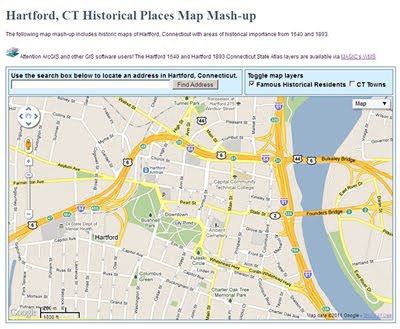
The screen below shows the historic maps from 1640 and 1893, as well as recent aerial photos. Click the box that says “Famous Historical Residents” in the upper right of the screen to view where famous early Hartford residents lived in 1640.

List of landowners and corresponding land parcel numbers for 1640 map (click to enlarge):

To view the 1640 map in flickr, click here: http://www.flickr.com/photos/uconnlibrariesmagic/3836896031/

To view the 1893 map in flickr, click here:
http://www.flickr.com/photos/uconnlibrariesmagic/3837687450/

Links about the early settlers of Hartford:
http://www.hartfordhistory.net/faq.html

http://en.wikipedia.org/wiki/History_of_Hartford,_Connecticut

Did You Know? #6 Raster Vs. Vector

Geographic Information Systems (GIS) primarily use two categories of digital data: 1) Raster Data and 2) Vector Data.
Raster Data:
Raster Data portrays real world data as a matrix or a grid of cells (see Figure #1). Raster data is very good at storing continuous data (for example: precipitation, temperature, and elevation). Each cell stores information numerically, usually between 0-255 and has a geographical location. A weakness of raster data is that the cells are squares and most real world information doesn’t fit into a perfect square(See Figure#2). So sometimes a map made with satellite imagery will either underestimate or overestimate a land cover type.

Vector Data:
Vector Data portrays real world data as a point, line or polygon. Vector data is very good at storing discrete data (for example: political boundaries, rivers, lakes, land parcels, and streets). Each point, line, or polygon is called a feature and has a unique ID# (see Figure #2). Attribute information can be added to each feature in geographical space. A weakness of vector data is that it sometimes needs great amounts of processing power to run a complex analysis.
Below are links to examples of raster (Source: ESRI) and vector data (Source: CT DEP, MAGIC)
Click to view an example of vector data (point features):
Click to view an example of vector data (polygon features):
Click to view an example of vector data (Line features):

Did you Know? #5 Monitoring Climate Change

The discussion about global warming and climate change has largely focused on the increasing amounts of carbon dioxide released in the atmosphere. But how do we know this? One of the major carbon dioxide monitoring stations is located in an unlikely place; near the top of a 14,000 foot volcano on Hawaii’s Big Island.


Mauna Loa Volcano, Hawaii

Mauna Loa Observatory is found on the Mauna Loa volcano at an elevation of about 11,000 feet. Why collect data about carbon dioxide levels on top of one of the largest volcanoes in the world? Mauna Loa’s remote location and high elevation ensures that carbon dioxide measurements are the most accurate possible since they are not greatly affected by major sources of air pollution in Asia, America, and Europe.

Carbon dioxide measurements were first taken by Charles Keeling in 1958. Since then, the amount of the gas in the atmosphere has steadily increased from 315 parts per million to 385 parts per million.

View Larger Map

NOAA’s Mauna Loa Observatory

The tall tower takes carbon dioxide measurements at the observatory

Keeling’s graph of carbon dioxide levels, often called the Keeling Curve. The curve’s annual fluctuations are due to plants in the northern hemisphere absorbing carbon dioxide in the summer and then releasing it during the winter as deciduous trees lose their leaves.

How in the World? #3 – Georeferencing

In our first “How in the World” we showed you how a paper map is scanned and converted into a digital image. The map has geographic information drawn on it, but once it’s scanned it’s still just a picture. How can we place the image so that its extent is defined in physical or geographical space? We georeference it, that’s how!

Remember our Map of the Week featuring Sachemdoms, villages and trails? It began as a paper map, now it’s a digital masterpiece! All it took was:

  • A vector file (most commonly referred to as a Shapefile or Coverage)of Connecticut with latitude and longitude information stored within,
  • Our scanned Image,

  • And GIS Software.

Basically, we display both images on the computer screen and stretch them so the boundaries match and then tack them in place. When we tell the software to save the original paper map image, it also saves the latitude and longitude information with it. This information allows us to use it in other GIS programs or Google Maps! Watch this video to see how we georeference a paper map!

IT’S MAGIC!
~Jeff

Did you know? #3

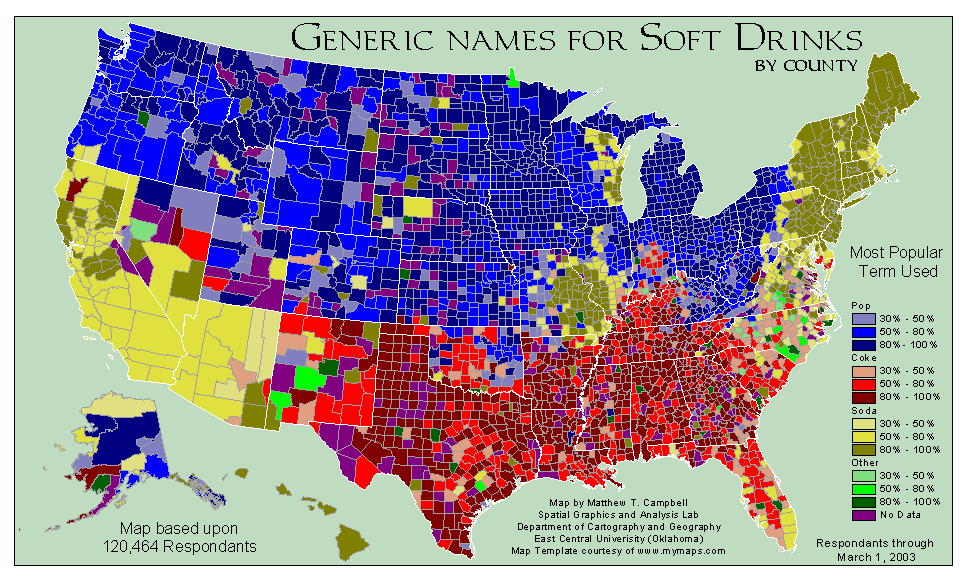
The term for “soft drink” varies significantly across the United States. “Pop” is most often used in the Midwest and Northwest. People who use the word “soda” are most often found in the Northeast, Arizona, and California. Finally, “Coke” is commonly used to describe a soft drink in the South.

Map of the Week! Connecticut Tribes Circa 1625

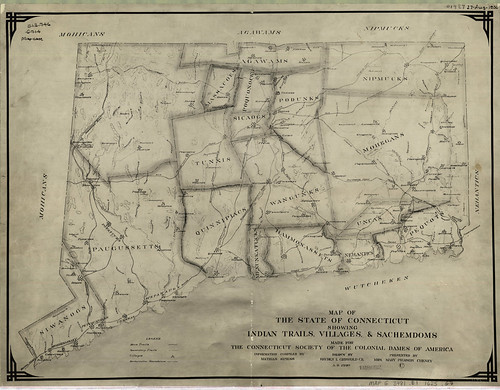
” Map of The State of Connecticut Showing Indian Trails, Villages & Sachemdoms Made for The Connecticut Society of The Colonial Dames of America

On this map made in 1930 we can see 19 Native American Sachemdoms of 1625 delineated in, and around the state of Connecticut. What exactly is a Sachemdom? It’s the territory of a Sachem. OK, so what exactly is a Sachem? A Sachem is the title of leadership in a Native American Tribe…so tying it all together a Sachemdom is the territory of a particular Native American Tribe under the leadership of Sachem. Got it?

So which 19 Sachemdoms are featured on our map? Here’s a list with links to informational websites. These sites are by no means the singular authorities on each tribe but it should make it easier for you to get a head start when gathering your own information!

Mohicans
Paugussetts
Siwanogs
Agawams
Massacoes
Tunxis

Quinnipiacs
Menunkatucks
Wangunks
Sicaogs
Poquonocks
Podunks
Hammonassets
Nehantics
Uncas
Mohegans
Nipmucks
Pequots
Wutcheken

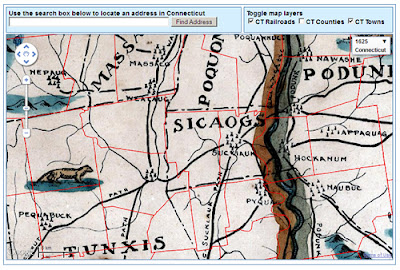
Along with the tribe names listed above you will notice that there are major trails and pathways delineated on the map as well. What kind of impact do these trails and pathways have today? Examine the following map, toggle on the railroad layer located on the right. Do any of the railroad tracks line up with the trails? What other modern day features do you think would follow these trails?

Click the above image to View Interactive Map Mash-up

Thanks to Benjamin Spaulding for the education and assistance in creating this mash-up!
Also of interest is the following related reading material:
Trumbull, James H. Indian Names of Places, etc. In and On the Borders of Connecticut: With Interpretations of some of them. Hartford : Press of the Case, Lockwood & Brainard Co., 1881

Use the search tool to find instances of the tribes or villages that are featured in the map in the text of James H. Trumbull’s book!

James Hammond Trumbull was born in Stonington, Connecticut in 1821 and died in Hartford, Connecticut in 1897. He was the Assistant Secretary of State for Connecticut, the Connecticut State Librarian, President of the Connecticut Historical Society and was elected to the National Academy of Sciences.

For more information on James Hammond Trumbull, try this link to the National Academies Press.
OK, one map, lots of information. Thanks for stopping by!
~Jeff

How in the World #2

How in the world can the average person access GIS data just as easily as mapping professionals?

In the last “Did You Know?” We introduced GIS (Geographic Information Systems), how it works and what it is used for. Today we would like to show you how to retrieve and view GIS data. You might ask yourself how you can do this without specialized GIS software. No worries, we’ll show you how. All you need is your internet browser!

First, navigate a separate internet browser window to http://magic.lib.uconn.edu/ , once there click on GIS Data located on the top navigation bar

On the next page you will see several icons shaped like the state of Connecticut with categories listed beneath. Today we’re not interested in roads or political boundaries, Brandon and Jeff are going fishing! Jeff knows there are lots of boat launches on the coast but he can’t remember if there is one near Point Bluff State Park. To find out if there is a boat launch click on the Places data category on the right hand side:

This will take you to the places data on the GIS Data page where you’ll find a GIS data layer for Boat Launches! Listed information includes the date, the source (in this case the Connecticut Department of Environmental Protection), and data formats. Today lets preview this data in Google Maps, so on the right hand side of the screen click on the map preview icon:

Your internet browser will now display all of Connecticut’s boat launches in Google Maps:

Let’s check out if Bluff Pont State Park has a boat launch, look at the listing of boat launches on the left, Click on Bluff Point Boat Launch. A balloon will appear on the map giving the location of the boat launch. So we’re done right? We now know that there is a boat launch at Point Bluff State Park. But what if we need bait or fishing tackle while we’re out fishing? Let’s use Google Maps to find out.

On the Bluff Point Boat Launch Balloon, click search nearby. In the text box type Tackle Shop then click the search button.

Google Maps will now display all the tackle shops in the vicinity of the Bluff Point Boat Launch. By clicking on any of the markers a balloon will display the tackle shops name, address, and phone number. You’ll also have the option to get driving directions!

Congratulations, you are now an experienced GIS user! In this exercise you have loaded, queried, and analyzed a GIS data layer! Now you can experiment with MAGIC’s other data layers and have fun making maps. Now you can love geography as much as Brandon and Jeff do!